Text over images
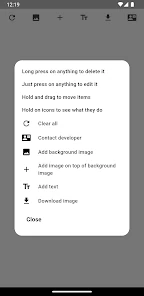
Add a title or message directly to a photo.

Tools
A simple Android tool for basic image editing, adding text, combining elements and rotating content.

Main features
Features are organized so users can complete the most important task quickly and without unnecessary steps.
Add a title or message directly to a photo.
Place one image over another to create a simple composition.
Adjust image orientation in a few taps.
The most useful features are available without complicated menus.
Save the finished image when you are done editing.
The app is designed for quick and simple work on your phone.
Screenshots
Why Image Wizard?
A simple Android tool for basic image editing, adding text, combining elements and rotating content.
The app is part of the InfinityRealm collection and is available for Android devices through Google Play.
Open Google PlayFrequently asked questions
For simple image edits, adding text and combining visual elements.
Yes. The app supports placing an image over a background image.
Yes. The current Google Play version is free and contains ads.
More apps
Privacy and data control
App data is stored locally and can be removed through Android settings or by uninstalling the app.